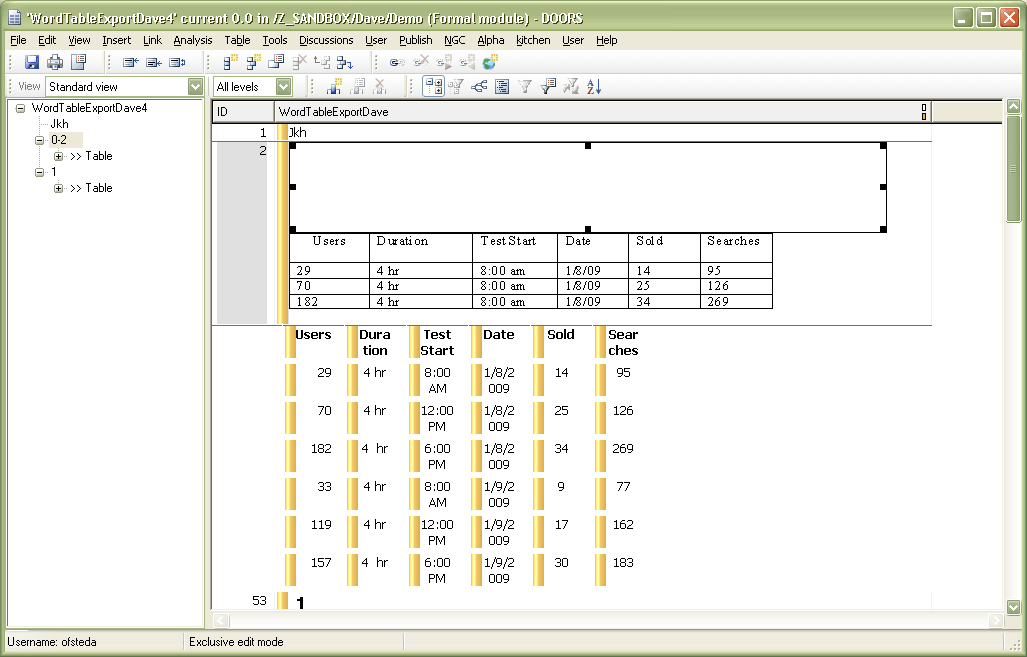
I created a solution to handle the situation where ole tables in Word are exported to DOORS twice. Currently we see one table that is visible and uneditable, and another one that needs to be double-clicked in order to see and edit it.
The solution was to add a little snippet of code to iutil.inc in C:\Program Files\IBM\Rational\DOORS\9.2\lib\dxl\utils
//  Begin code to fix duplicate table import into DOORS from Word
string s = stringOf richClip
RichText rt
EmbeddedOleObject ole
for rt in s do {
    if (rt.isOle) then {
        ole = rt.getEmbeddedOle
        oleCopy(ole)
        break
    }
}
//  End code to fix duplicate table import into DOORS from Word
I attached the modified file.
My question: Can we legally modify IBM's source code to fix problems in the DOORS application?
Or am I going about the duplicate table problem all wrong? Easier way maybe?
Thanks,
Dave
dofstead - Wed Sep 16 14:12:55 EDT 2009 |
|
Re: Possible solution to duplicate tables imported from Word
IBM_Gust - Wed Sep 16 14:43:57 EDT 2009
I would take a guess that your problem is possible because you have wrong DOORS.dot file for the particular version of DOORS.
The wrong DOORS.dot file can occur if multiple versions of DOORS are installed on the same client.
Multiple tables export is not normal behavior for export tool.
|
|
Re: Possible solution to duplicate tables imported from Word
dofstead - Wed Sep 16 15:19:15 EDT 2009
rslerl,
As luck would have it, this pc did have 8.3 at one point. It now has 9.2.
However
C:\Program Files\Microsoft Office\OFFICE11\STARTUP\doors.dot is dated 4/6/2009
which matches the date for
C:\Program Files\IBM\Rational\DOORS\9.2\lib\word\doors.dot
Are you using v9.2 as well?
According to the list of known issues in v9.1, this duplicate table problem is unresolved for Office 2003 - which I am using. Perhaps you have a different version of Office?
Thanks for suggestion.
Dave
|
|
Re: Possible solution to duplicate tables imported from Word
dofstead - Wed Sep 16 15:26:28 EDT 2009
"duplicate tables" may not be a great description of the problem. After the import is complete, the user really only sees one table. However there is an empty area above the visible table that is the same size as the visible table. It requires a double-click on the empty area to see the duplicated table.
|
|
Re: Possible solution to duplicate tables imported from Word
IBM_Gust - Wed Sep 16 15:59:07 EDT 2009 dofstead - Wed Sep 16 15:26:28 EDT 2009
"duplicate tables" may not be a great description of the problem. After the import is complete, the user really only sees one table. However there is an empty area above the visible table that is the same size as the visible table. It requires a double-click on the empty area to see the duplicated table.
|
|
Re: Possible solution to duplicate tables imported from Word
IBM_Gust - Wed Sep 16 16:01:29 EDT 2009 IBM_Gust - Wed Sep 16 15:59:07 EDT 2009
I tried a export from Word 2003 to DOORS 9.2 and did not see the behavior you described.
|
|
Re: Possible solution to duplicate tables imported from Word
dofstead - Wed Sep 16 16:22:37 EDT 2009
In the example picture attached the selected empty box is the duplicate I am discussing. A double click would reveal the editable table.
Note: The DOORS-style tables import just fine - one of these is also shown in the picture. It is the OLE-style table above it is the type that has the duplicate problem.
A complete search of my c drive only showed doors.dot in the two locations I mentioned above. Both files had the same date and size. Copying the doors.dot to the IBM folder did not help.
Attachments
attachment_14296041_example.gif
|
|
Re: Possible solution to duplicate tables imported from Word
kbmurphy - Thu Sep 17 13:54:03 EDT 2009 dofstead - Wed Sep 16 16:22:37 EDT 2009
In the example picture attached the selected empty box is the duplicate I am discussing. A double click would reveal the editable table.
Note: The DOORS-style tables import just fine - one of these is also shown in the picture. It is the OLE-style table above it is the type that has the duplicate problem.
A complete search of my c drive only showed doors.dot in the two locations I mentioned above. Both files had the same date and size. Copying the doors.dot to the IBM folder did not help.
My code to fix it is attached.
Attachments
attachment_14296410_fixOLEs.dxl
|
|
Re: Possible solution to duplicate tables imported from Word
llandale - Thu Sep 17 17:07:48 EDT 2009
Don't know about the legality of modifying that code, but don't tell them since it will likely 'negate' your support contract.
When we had this, I just edited the invisible diagram, modified it in some simple way I don't recall (I think changing the size), which made it visible. Then deleted the visible one.
|
|
Re: Possible solution to duplicate tables imported from Word
dofstead - Thu Sep 17 17:11:32 EDT 2009 llandale - Thu Sep 17 17:07:48 EDT 2009
Don't know about the legality of modifying that code, but don't tell them since it will likely 'negate' your support contract.
When we had this, I just edited the invisible diagram, modified it in some simple way I don't recall (I think changing the size), which made it visible. Then deleted the visible one.
Your approach matches what we are experiencing. I am attempting to head off this problem for users who are new to DOORS and might not even realize what is going on.. they just notice an odd empty space, and a table object that they cannot edit.
You say "When we had this...". You do not have it anymore? Any ideas why?
Thanks,
Dave
|
|
Re: Possible solution to duplicate tables imported from Word
llandale - Fri Sep 18 09:01:41 EDT 2009 dofstead - Thu Sep 17 17:11:32 EDT 2009
Louie,
Your approach matches what we are experiencing. I am attempting to head off this problem for users who are new to DOORS and might not even realize what is going on.. they just notice an odd empty space, and a table object that they cannot edit.
You say "When we had this...". You do not have it anymore? Any ideas why?
Thanks,
Dave
|
|
Re: Possible solution to duplicate tables imported from Word
dofstead - Wed Sep 23 14:23:50 EDT 2009
We tested this on a PC with Office 2007 installed and where only DOORS 9.2 was ever installed and observed the same duplicate table phenomenon.
We also noticed on our Terminal server with DOORS 9.2 and Office 2003 that this problem does not exist.
/scratches head
|
|
Re: Possible solution to duplicate tables imported from Word
SystemAdmin - Thu Sep 24 04:47:22 EDT 2009 dofstead - Wed Sep 23 14:23:50 EDT 2009
We tested this on a PC with Office 2007 installed and where only DOORS 9.2 was ever installed and observed the same duplicate table phenomenon.
We also noticed on our Terminal server with DOORS 9.2 and Office 2003 that this problem does not exist.
/scratches head
/Kristian
|
|
Re: Possible solution to duplicate tables imported from Word
dofstead - Thu Oct 01 14:16:03 EDT 2009
IBM's response to my request to modify their iutil.inc:
"...I need to let you know that I cannot offer you the permission to modify that include file."
No explanation was offered.
|
|
Re: Possible solution to duplicate tables imported from Word
SystemAdmin - Tue Oct 20 13:48:11 EDT 2009 kbmurphy - Thu Sep 17 13:54:03 EDT 2009
I have this problem too.
My code to fix it is attached.
Thanks, that fixOle script helped - though I noted that it would not actually delete the static tables. None the less, getting the "real" tables all visible and filtering will cut down the fix time on large docs quite a bit.
Anyone have any ideas on dealing with Word Drawings that are importing as Static OLE's? I'm guessing that the issue is there is no file extention to associate it with, so Windows has no idea what to use to open them. Using Office 2003, and DOORS 9.1.
|
|